Announcement:

This is a Testing Annocement. I don't have Much to Say. This is a Place for a Short Product Annocement

Tuesday, September 18, 2012

One of the Fastest Way of Writing Blog Post

I just remember that I and my friend, who happened to be my partner here in SB, and was actively participating in our activities early this year was asking me how can I write a blog post within a couple of minutes - impromptu! I used to write this way, though I have ideas, but mostly, I write without an advance plan or outline about my next post. Why? Because the idea I have in mind is enough for me to write a new post! And I believe that this is one of the fastest way or technique to write a blog post, you can also read my impromptu writing within 20 minutes or less.
Why you can't even think of something?
It's because you believe you can't write at that very moment. You close the possibility of writing something for your audience that very day.
  • Obligation. Do you have the obligation to your readers, or least to your blog right now? It is to write or blog every day. You are there - show your presence.
  • Write a short precise post. You don't need to write a pillar article all the time. There must be some special time where you can spend almost your entire day to draft it down. If you are in a hurry, got a limited period for blogging, make it fast. Write fast - turn your ideas that very moment into words of wisdom.
  • Quality doesn't require you to draft a thousand words. Quality means useful, helpful, applicable, and so what if your post is short? If you are sure it contains something worth reading, don't hesitate to publish it.
  • Capsulized posting. I don't know if that term exist in the blogosphere, but my professor in my law subject told us last time that learning can best done in a capsulized way. It's done in list, remembering only those important keywords.
  • Well, know what? Posting short and precise is synonymous to capsulized way of informing others.
Update: 5 Powerful Tips on How to Write Blog Post Fast During Break Time
Have you tried it in your blog already? So people in a hurry will come there, because you provide instant information they need, without spending much time. How about pillar articles? Well, got a perfect time for it specially weekends? You can surprise your readers with one at least a month. Or, how do you prefer?

See you:)

Wednesday, September 5, 2012

Make Money By Posting and Responding Discussion at Mylot

Are you looking for ways on how to make money online? There are tired people from their offline jobs or jobless folks out there who have surfed the web for solutions to their problems. There are also working individuals who wants to make their break times and leisure activities compensating. So, we will figure out exactly how to do that without lies and absurd examples.
How can you make money during your vacant times at work?
Don't quit your job right now! Online promises a decent living to all who crave to make money in their living rooms without leaving their love ones, but right now there is no assurance because "success" cannot be obtained "overnight". You need to figure it out, and it takes time in the first place. Right now, do your job and make a plan to having a decent money making scheme online.
What is myLot and how can you make money there?
I purposely look for money making programs last 2007 when I was busy schooling as I wanted to look for extra money to cover up my school expenses. I found myLot. For all who became members of myLot, this discussion forum is paying all the time! Forget about scam, you are in good hands. The only good tactic you need to learn is how to reach the pay out every month to finally say you have found an extra money making leisure habit! Is it good?
How can you exactly reach the pay out?
Mainly, the list I made below are ways on how you will enjoy myLot, and compensate you for doing the things you love:
  • Find topics you want. You can select various topics, from parenting to sex, from sports to relationships. You can browse different top discussions, hot topics, recently responded or newly posted thoughts of myLotters (members or users) and participate by sharing your idea or opinion through responding the chosen post. In turn, you will earn real money.
  • Write and post topics of your interest. Do you want to talk about family matters? Browse all the interests available and add "family" or "parenting" and start a fresh topic right then. Write a reasonable length of your thought, give a catching title and post it. Cents will then starts to increase your earnings.
  • Refer your friends and family members to discuss what you've posted. Yes, promote your post to your sister or even classmates or office mates. Refer them to myLot and earn 25% from their earnings.
Those lists are the major ways on how you will reach your pay out every month when the myLot logo turns green! But it's not enough yet, I want to tell you good tactics on how to double your earnings, and how much exactly you can possible save their daily.
Here are the good tactics.
Daily regular participation will compensate you more. I don't want to assume the algorithm on how myLot computes your earnings per active myLotting (participation) but you will make "real money" every month if you want to. You can earn up to 1 dollar a day, in between your paperwork. You can allocate 5 minutes every hour to read and respond or write new topics you thought helpful or informative.

Use your "heart" by doing so - what I mean is "enjoy". Pick the interests you want to talk about or give opinion, and respond or write reasonable length of sentences and paragraphs to convince myLot you are serious and deserving to earn more.

Reasonable length does not really point out exact number of sentences, but avoid one liner responses or discussions. Do not post poll or "yes" or "no" questions. Do not promote other programs or referral programs, purely discuss without the aim to promote or advertise. Do not include in your conversation "pm me or contact me later". Directly send a friend or myLotter a private message to avoid violating the precious guidelines!

I strongly encourage you to read the guidelines! Topics and responses that violate the myLot guidelines are deleted by them! They are strict because they want to maintain a community free of scammed topics.
Register from here and start spending your vacant time productively.

Wednesday, August 15, 2012

Make Free Professional Blog Banners with Transparent Backgrounds

PhotoScape + FlamingText = Transparent background for blog banners

Do you wish to create a transparent background for your blog banners that will fit to your blog backgrounds without using Photoshop? Well, if you have a Photoshop installed in your PC, then you got no problem, but if you don’t you—need to continue reading this post.

There are several free banner makers out there, and one of them is BannerSnack, it is easy and instant medium of producing great banners, but the problem occur when you need to create a transparent banner to fit the background of your blog.

One of the easiest way to this is to use PhotoScape and FlamingText.

Steps:

  • Dowload PhotoScape safely using c|net here and install the all-in-one style photo editor (Mooii).
  • Here is a quick review of PhotoScape by death1968 at c|net:
Photoscape is a great programme for those who cannot afford Adobe Photoshop. It offers several filters, modification of curves (but not histograms), numerous pre-set effects (like specific film imitation effects, auto levels, vingetting, etc.). Batch processing permits for applying of routine adjustments (like renaming, photo enhancements, or re-sizing). Installation was easy (Win 7, 64 bit), software is stable, it is a full free version, contains no advertisements or junk add-ons. I can recommend Photoscape to anyone.

Create a transparent background using FlamingText with the help of PhotoScape:

  1. Choose logo from the 'Featured Logos' at FlamingText.
  2. Create a logo with transparent background, see screenshot below:
  3. Download the logo by clicking download, save file!
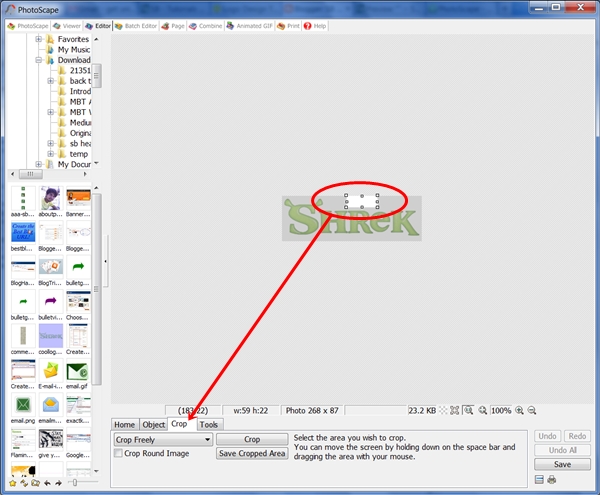
  4. Go to PhotoScape (assuming you are done installing it) and open Editor and look for your downloaded logo, then crop a little portion of the transparent logo background as shown below:
  5. Save the cropped image, re-size it (bigger), and save it as a permanent image for transparent banner making. In the example, I re-sized the image to 950 X 250 and saved it as transparent950X250.png which is good for blog header banner with transparent background! Remember, transparent image has a file extension of .png!
  6. Now, let's begin making a transparent banner for you blog. Use PhotoScape in making your banner, you can also create separate logos at FlamingText and combine it at PhotoScape Editor using the transparent image you just created. The banner below is for the SB Test Blog:
  7. See, it would fit to several blog backgrounds:

Are we done? No...

A creative blogger experiments, try to make your own, try to produce several banners of different styles, colors and sizes using this free resources and smart technique!

See you...

Saturday, August 11, 2012

Custom Contact Form for Your Blog - The Easiest Way!

Blogger is widely used as blogging platform, but if you wish to give your readers access to you privately, you need to rely on free contact form widgets to do that. Fortunately, we have so many free web resources to use. Anyway, why not give readers your email address directly? The answer is simple - it's not safe. You hate spammers right? In addition, I have found 3 Contact Form Builders that can provide you safe medium of communication with your valued readers.

If you want to customize the look of your contact form to make it part of your blog theme, you can do that easily by following a tutorial I simplified for you. It's the easiest way of adding a customized contact form to your blog without going to your blog template. Just create a new page, then paste it there! As simple as that. Are you ready? We will be using emailmeform!
This tutorial has two parts. First, the installation of your custom contact form which is very simple! Second, creating your account at emailmeform which is guided here step by step with illustrations.

First Part: Log-in to your blog and click Posting, but instead of choosing New Post, select Edit Pages. Then, click New Page!
Just like writing your new post, think of a name e.g. Contact Me or Contact Us. Carefully Copy the codes after the screen-shot below and Paste them there. Yes, as simple us that. Just above the pasted codes, you can write something...
Carefully copy the codes just below and paste it - see screen-shot above:
<style>
/* contact me form: tutored by MBT (mybloggertricks.com), redesigned by Prime Aque-SB (simplifiedblogging.com) */
input.sbcontact {
color:#000000;
font: 12px Arial,Helvetica,Sans-serif;
background-color:#FFFFFF;
padding-left: 6px;
border:2px solid #347235;-moz-border-radius:5px;
-webkit-border-radius:5px;
border-radius:5px;
}
input.sbcontacthov {
color:#FFF;
font: 12px Arial,Helvetica,Sans-serif;
background-color: #347235;
border:2px #733572 solid; -moz-border-radius:5px;
-webkit-border-radius:5px;
border-radius:5px;
}
textarea {width:97%; color:#000000;
font: 14px Arial,Helvetica,Sans-serif;
background-color:#FFFFFF;
padding-left: 6px;padding-right: 6px;padding-top: 6px;
border:2px solid #347235;-moz-border-radius:10px;
-webkit-border-radius:10px;
border-radius:10px; }
textareahov { width:97%;
color:#FFF;
}
</style>
<form action="http://www.emailmeform.com/builder/form/sARau137XI0" charset="UTF-8" enctype="multipart/form-data" method="post">
<table bg="" border="0" cellpadding="2" cellspacing="0" style="color:white;"><tbody>
<tr><td><span style="font-family:Verdana;font-size:85%;color:black;"></span><div id="mainmsg">
</div>
</td></tr>
</tbody></table>
<table bg=""border="0" cellpadding="2" cellspacing="0" style="color:white;"><tbody>
<tr valign="top"><td nowrap="nowrap"><span style="font-weight: bold; color: rgb(102, 102, 102);font-family:Verdana;font-size:12px;">Name:</span></td><td><input class="sbcontact" maxlength="100" name="FieldData0" size="40" value="" type="text"> </td></tr>
<tr valign="top"><td nowrap="nowrap"><span style="font-weight: bold; color: rgb(102, 102, 102);font-family:Verdana;font-size:12px;">Email:</span></td><td><input class="sbcontact" maxlength="100" name="FieldData1" size="40" value="" type="text"> </td></tr>
<tr valign="top"><td nowrap="nowrap"><span style="font-weight: bold; color: rgb(102, 102, 102);font-family:Verdana;font-size:12px;">Subject:</span></td><td><input class="sbcontact" maxlength="100" name="FieldData4" size="60" value="" type="text"> </td></tr>
<tr valign="top"><td nowrap="nowrap"><span style="font-weight: bold; color: rgb(102, 102, 102);font-family:Verdana;font-size:12px;">Message:</span></td><td><textarea cols="90" name="FieldData5" rows="15"></textarea></td></tr>
<tr><td colspan="2"></td></tr>
<tr><td></td><td align="left"><input maxlength="100 " name="hida2" size="3" style="display: none;" value="" type="text"><input onmouseover="this.className='sbcontact sbcontacthov'" onmouseout="this.className='sbcontact'" class="sbcontact" name="Submit" value="Submit " type="submit"> <input onmouseover="this.className='sbcontact sbcontacthov'" onmouseout="this.className='sbcontact'" class="sbcontact" name="Clear" value=" Clear " type="reset"></td></tr>
<tr><td colspan="2" align="center"></td></tr>
</tbody></table>
<p></p>
<i><a href="http://www.simplifiedblogging.com/2012/01/custom-contact-form-for-your-blog.html">Make your own custom contact form!</a></i>
</form>
Preview your contact page, if it's working, publish it right then so we can proceed to the next part!


Second Part:

1. Sign up or Register at emailmeform.com, if you are done, find for the button Add Form, kindly follow screen-shots.

NOTE: Please save every changes you'll going to make.


2. Click Add Form button and a pop-up box will appear giving you two choices. Please click the first one which says I'd like to choose from a list of free-made forms.


3. You will be redirected to a page containing a simple contact form, the next step is to click customize button.


4. This time, you need to open the settings to make some important changes at its default settings.


A. In your confirmation setting, choose redirect URL. You can either use the contact us page URL (if you want this, copy your contact page URL you recently published) or your blog homepage URL. If you choose the first, then after your reader sent his message, emailmeform will redirect him again to your Contact Page, or if you choose the second one, you reader will be redirected to your blog homepage.

B. In your Label Placement setting, choose Left Aligned.

C. In your Send Button Alignment setting, choose Left.

D. In your Anti Spam setting, choose None. Most blog spammers do not disclose information, since they are required to submit valid email address, they might hesitate to spam you. Now Save!

5. After saving data, choose Take me back to the form manager. Base on the screen-shot, kindly click notifications.


6. This time you are under Recipient Notifications page, the recipient is you so you need to provide your valid email address where you wish to receive messages sent to you via your blog contact page. Carefully supply your email address and click that green plus button and save your data again!This time, choose Open new window and view my form!


7. You are almost done! A new window or tab will open containing your contact form. All you have to do is Copy and Paste your full contact form URL at the address bar as shown below and securely put it in a notepad.


8. Please go back to you blog dashboard and this time, edit your contact page, you need to change the contact form URL (as the default is mine). Note: Please do not get confuse with the screen-shot as I made the marking in a notepad, now proceed to your Contact Page and carefully find the code I gave below.


>>Search for http://www.emailmeform.com/builder/form/sARau137XI0 (the one enveloped with blue box in the screen-shot) and replace that one with your contact form URL you recently pasted in a notepad! Carefully watch for the opening " and closing " just before and after the contact form URL at the codes provided, never omit any of them.

Note: You might also want to change the border color of your custom contact form, so if in case, please follow the one I enveloped with red boxes.

9. If you make changes with the border color, preview it before publishing just to make sure your new color is showing! If it's perfectly working, published your contact page! Now your Contact Page is ready!

If in case you encountered some problem, please do not hesitate to send your queries at the Contact Us Page or directly drop them at the comment area.

Thursday, August 2, 2012

Free Web Resources that Analyze Your Blog Traffic

There are numerous small pieces and programs of software on the web which can create your blog very nice and very proficient, to spotlight on some special programs which will assist you to discover what type of traffic you are receiving and whether it is helpful web traffic or in case you are receiving any type of traffic at the entire.
The primary piece of the resource or software is known as Google Analytics.
This is completely free type of resources and software which you can place into the code of website or blog. In case you are not very relaxed with regulating the code of website or blog do not be anxious, there are extremely clear commands on where to position it. One time there it can provide you the entire types of helpful details such as the person who is searching your website, from where and how lengthy they are spend on every page. This can assist you to search out what is receiving the mainly attention on the website and after that you can correct your website content consequently.
The next resource or pieces of the software which will confirm helpful arrive from the website known as click tale.
This is the same piece of the software in a few manners except it shows details in the mode of image so you can distinguish what persons have been performing on your site and wherever they have been hitting. It even has the helpful characteristic of displaying you where persons are ending on your webpage. This assist you situate the adverts wherever they are moving to be observed the mainly. It is completely free for the essential service except you can compensate for the service of premium facility. In case you are simply just beginning out then it is value paying for the service of premium membership.
The final resource or piece of program is known as stat counter.
This is good as it display you extremely just how a lot of persons have searched your site and how a lot of of those are exclusive visitors. It possibly does not provide you the similar type of information like the additional two except it is the very obvious and it is the just single that permits you to place a counter on the website. You can allow persons who search your site or online blog to appear at this information or only explain them how a lot of persons have been to your website.

Image Source: volacci.com

Saturday, July 28, 2012

Download Free Social Icons in 3D for Free – 6 icons in 3 sizes

Are you in need of pretty sets of social icons in 3D with names on it? We have the latest link to its resource so that you can get them, in different sizes for free!
Why social media icons important?
Instead of simply putting an anchor text or link of your social participation like Facebook, Twitter, Google+ on your blog sidebar or header, you actually put an art to them by using social icons. The problem is, if we have no enough knowledge about Adobe Photoshop, we cannot able to make a beautiful sets to impress our readers. But we got alternatives!  We can use icon generators, or icons search engines to search for downloadable sets that may suits the template of our blog. Below are my previous posts that will tell you how exactly a newbie can generate an amazing icons:
Aside from that, as I am so addicted to collecting some free fine-made icons to make our blog more alive and engaging, we can now have 6 popularly used icons in 3D, in 3 different sizes like 48, 64 and 128 pixels! So, if you feel the need of changing your old icons, or if you don’t have any – you can get this one anytime from one of my favorite blog since I started blogging – Spice Up Your Blog! Click the image to download! (Scroll down below to see how to use social icons properly.)
3d-social-icons-main-screenshot
How to Use Social Icons?
After downloading, unzipped it first! How?
Simply go to the download folder, right lick on the zipped file, then extract it to a specified location or folder.
You can now open all of them, choose what size you want and upload them to your image hosting sites, like Picasa, Flickr, etc.
How to Link the Icons to My Social Networks?
It’s like making a banner that works, please check this short tutorial!
What are you waiting for? Any question, feel free to ask.


See you!

Friday, July 27, 2012

Quality, Professionalism and Marketing Lead to a Successful Blogging

As early as stage one of blogging, you are doing every possible way to promote your newborn blog. What it takes though? Promotion is one of the biggest challenges that would test your determination and dedication. Sometimes, you tried to compare your blog to the established ones which receive high amount of traffic daily, yet the comparison would stumble you down. Do not try to compare, but instead, focus and concentrate in building a paved way.
Successful Blogging

Discover the happenings behind the scene.

You won't understand unless you know the true story. Ask yourself why they have gone that far. Have they traveled a long long way or have they taken the shortcut? The answer was revealed to me, if you are serious of what you are doing now, then it's a long trip ahead. There is no shortcut.

Fasten your seat-belt and get ready for the bumpy drive.

That's the first thing you can do. Are you dedicated enough? Then you are ready to bring it on. You might be looking for the secret formula to bring your blog to the next level, but the secret entails effort as there is no overnight success. If you are waiting for that to happen, you are then wasting your time. You are like driving in a hurry with a seat-belt off, a traffic officer caught you.

Focus. Do not be overwhelmed with so many secret formulas.

None of them would work if you skip the basic. This is the story behind the scene of those successful bloggers in the vast blogosphere.
Quality Content + Professional Template + Marketing = Successful Blogging
  • Quality is always the king - do not compromise the quality of your posts with quantity. If you want to post twice a day, make sure it would meet a certain standard. What's important, post or blog often. Strictly observe on your grammar, spelling, and of course the message of your post. Are you telling them something worth reading?
  • Professional Template - a professional looking template is a blog theme with a friendly interface. Observe cleanliness and orderliness, make sure it would accommodate your readers well. Give them a virtual home to stay with.

    One important factor is the load time, do not stuff your blog with so many third party applications or plug-ins, it would sacrifice its speed. And, not the least, apply basic SEO or get a free professional blog template.

  • Marketing - Do you have great and useful contents to market with? Is your blog can able to accommodate prospected readers already? Then you should take another extra step-- marketing! If your blog deserve promotion, why not? It's your time to shine.

    There are various media of marketing, and one of which is getting involved with the most flocked social networks nowadays like Twitter and Facebook. This is the time to participate well with social networking sites to get more visibility.

Are you ready to get more twitter followers?

Get More Twitter Followers
The counts of your twitter followers, for example, would help you spread the good news about your blog a bit faster. Spending some extra amount from your pocket won't hurt if you see that your blog is energetically participating the race. So, do not miss the opportunity in receiving 1000 Twitter followers or more in just a matter of a week. You are in the concentration of providing your readers with quality blog posts, let the promotion be done by an expert who offers reliable service with a cheap price! How is the idea of killing a mosquito one by one?

In fact, I get more than a thousand Twitter followers in a week. So, are you ready to Buy Twitter Followers? I am sure BuyRealMarketing can help you.

More about BuyRealMarketing.com at PRWeb.

Final Words:

Successful blogging is possible when you only post quality contents, and a provide your readers with a professional blog template or theme. BUT, you cannot press the equal sign, the formula is not yet complete. Remember: Quality Contents + Professional Template + Marketing = Successful Blogging.


Image credit from freedigitalphotos.net (edited)

Tuesday, July 24, 2012

Rebuild Your Path - a Way to Better Blogging

Let me share to you what inspired me today - it's an article from my newly found mentor for blogging, Samantha Gluck, she will lead us the way to find inspiration in our broken paths.
It's motivational and inspiring. In the early days of blogging, what are the things that made us think it's impossible to get successful? Let me enumerate mine:
  • Content - Content and Quality is the king. How can I survive? How can I produce original and quality contents as often as possible?
  • Traffic - the most challenging ever. How can I grow my traffic? It's not an overnight task. It's tricky. It's hard... It's hard to befriend the search engines.
  • Authority - one of the hardest. It's synonymous to respect us well. Once blogger has it, it's not really hard for him to promote his contents.
  • Money - if I don't blog for money, I might have abandoned this blog. It's about patience and waiting for the "perfect" time. Can you wait?
Despite of that, am not broken really, she don't believe that dreams can be broken down into pieces - it's just lost for some reasons.

The factors I have mentioned sometimes steal my dreams and put it somewhere, but through looking at successful people, by observing how they thrive and fight to make their dreams come true... I guess I would spend time to search it from nowhere and possess it again.

Image source: thesolesearch

See you.

Monday, July 23, 2012

How to Get More Blog Traffic – Join Triberr

How is blogging after the Google Penguin Updates?  Well, I would say my traffic decreased. That’s the reality. Penguin wants “natural” – that means natural way of building authority and back links. How can we do that?

It’s when we learn how to use social networks, and blogging community to raise traffic and engagement to our blog (the best alternative). That’s my biggest mistake done early this year – I abandoned my community to write for the search engines.

Authority and back links can be built naturally, and readers, followers and friends will do that. Early today, I receive a long craved comment to SB, after I lost the sight of my old friends in the blogosphere. I checked it out and enjoyed commenting again to Lisa’s nice posts – and I learned how triberr increase and double her traffic.

If you are familiar with Bloggers.com, it sounds familiar – yet there is something you should check out!

Basically, to join triberr, you need to provide your email address and blog URL, then allow triberr to access your twitter account – that’s how you can automatically log-in and set the rest manually.

How to add your blog to your newly created account?

triberr

  1. Setting – click the down arrow next to your profile name and select settings.
  2. Choose blog settings.
  3. Blog URL is automatically added, so provide your feed URL.
How to Find Blog Valid Feed URL? (for Blogger blogs)

It’s simple, copy the address below and add it to your blog address.

/feeds/posts/default

It would look like this:

http://www.simplifiedblogging.com/feeds/posts/default
Then Discover More!

Tribes – to start browsing tribes, you need to add your interest and start connecting.

triberr2 Bonfires – or should I say it’s the “tweets” if we talk about twitter.

Bones – it’s  your fuel, or rights to make an invites… 15 bones per invites, upon joining you got 100 bones… let’s discover more – that’s my initial know-how!

So I guess we should give a try Lisa’s tips to increase traffic!

See you:)

Saturday, July 21, 2012

Find Most Popular Stories and Favorite Topics at Alltop

Overview

Googling. That’s the usual thing we do when we want to look for popular stories, or looking for hot blog topics of our interests.

Twoogling. I guess this would only happen when Google takes over Twitter (acquire), since many of us, including myself love tweet searching using hashtags. When the term twoogling created? Read Google Enter the Twitter Game.

Anyways, what else you do to find the hot stories of the day? Whether it’s about blogging, health, politics, etc? Well, to be honest, I don’t know what to do… I want to write new topics but it seemed what I have in mind may be to repetitive with my previous posts, so I search for fresh, hot or popular topics to “duplicate”… No, just kidding. Searching for topics to help write mine, that’s what I mean.

Alltopping. My Post editor lined this term read, so just added Alltopping to dictionary, same as Googling or Twoogling, you can easily find the most popular stories in a super clean interface – that’s Alltop!

Well … browse the homepage and see what’s hot! Or, find for the latest feeds by searching popular topics by keyword or interest – there you can find at the top! Or simply type it at the search bar!

alltop

What’s really awesome, you can select the latest, or popular topic in a clean sheet like this:

alltop1 After a couple of hours, trying to look for the most attractive title at the search results – I have found 1 or 2 blogs I read with interest, and I discovered new blogging ideas.

You know, sometimes, bloggers need to go out in the open! Sometimes, I don’t do that. When am to loaded with task, I just write, write and write. Well, it’s not bad, but, we must listen to the news. What others are craving to know? What others are saying? What’s going viral? Catch it up! Alltop can give you, in few clicks – all the top stories, from work to sports, from health to blogging!

See you.

Copyright @ 2013 Simplified Blogging. Designed by Templateism | Love for The Globe Press